
What Terminal Is Lufthansa at Madrid Airport? (MAD)
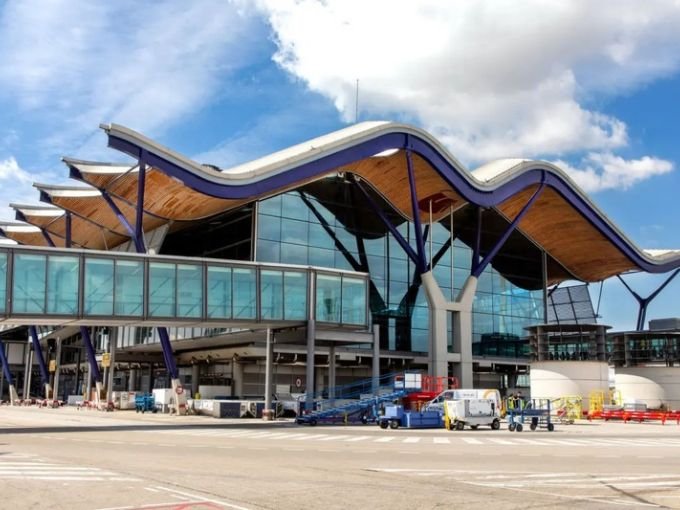
Lufthansa Airlines operates from Terminal 2 at Adolfo Suárez Madrid-Barajas Airport MAD. Passengers travelling from Madrid to destinations such as Frankfurt and Munich can find Lufthansa check-in facilities on the second floor of Terminal 2 in the departures area. The airport provides check-in counters, baggage services, security screening, and passenger facilities to help travelers prepare for their flights.
Before leaving for the airport, check your booking confirmation and flight status. Although Terminal 2 is the listed terminal for Lufthansa, some codeshare flights may operate from another terminal, so it is important to verify the details of your particular journey.
Lufthansa Airlines Terminal Details at Madrid-Barajas Airport
| Airport Information | Details |
|---|---|
| Airport Name | Adolfo Suárez Madrid-Barajas Airport |
| Airport Code | MAD |
| Airline | Lufthansa Airlines |
| Terminal | Terminal 2 |
| Check-In Location | Second floor, departures area |
| Check-In Counters | 415–419, according to Aena |
| Departures MAD | Terminal 2 for scheduled Lufthansa-operated flights |
| Arrivals MAD | Check the individual flight’s arrival terminal |
| IATA Airline Code | LH |
| Main Destinations | Frankfurt and Munich |
| Lost Baggage Assistance | Groundforce: +34 913 243 453 |
Lufthansa Airlines Check-In and Baggage Services at MAD
Passengers departing from Madrid should visit the designated Lufthansa check-in counters on the second floor of Terminal 2. Allow sufficient time for check-in, baggage drop, document verification, and security screening.
| Service | Information |
|---|---|
| Airport Check-In | Terminal 2, second floor |
| Check-In Counters | 415–419, as listed by Aena |
| Online Check-In | Available through the airline’s official website |
| Baggage Drop | Follow the signs to the designated counters |
| Baggage Allowance | Depends on the ticket, route, and cabin class |
| Travel Documents | Carry your passport and required documents |
| Security Screening | Complete screening before proceeding to the boarding gate |
| Gate Information | Check airport screens for the latest assignment |
Lufthansa Airlines Arrivals and Departures at Madrid Airport
Terminal 2 is the main terminal listed for Lufthansa at Madrid Airport. However, passengers should verify their flight information because codeshare services and operational changes may affect the terminal or boarding gate.
| Flight Activity | What to Know |
|---|---|
| Departures MAD | Check your boarding pass and the airport departure screens |
| Arrivals MAD | Confirm the arrival terminal and estimated landing time |
| Frankfurt Flights | Check the latest departure and arrival information |
| Munich Flights | Verify the assigned terminal and gate |
| Codeshare Services | Confirm which airline operates your flight |
| Baggage Collection | Follow the arrival screens to the assigned carousel |
| Connecting Flights | Check the next flight’s terminal and allow time for transfers |
Passengers meeting arriving travellers should monitor live flight information before heading to the airport. If you are connecting to another flight, follow the airport’s transfer signs and confirm whether you need to change terminals.
Lufthansa Airlines Passenger Facilities and Airport Services
Madrid Airport offers a range of services to help passengers prepare for departure or manage their arrival. Available facilities may vary depending on the terminal and operating hours.
| Facility | Details |
|---|---|
| Restaurants and Cafés | Food and refreshments are available in airport passenger areas |
| Shopping | Shops and travel essentials are available throughout the airport |
| Lounge Access | Depends on ticket class, membership, and eligibility |
| Wi-Fi | Airport Wi-Fi is available |
| Special Assistance | Arrange mobility assistance with the airline or airport in advance |
| Baggage Support | Contact the designated baggage-handling service for lost luggage |
| Airport Transfers | Follow airport signs for connections between terminals |
Lufthansa Airlines Official Website and Important Madrid Airport Links
Use this table to find the airline’s official website and useful airport resources in one place.
| Resource | Direct URL |
|---|---|
| Lufthansa Airlines Official Website | https://www.lufthansa.com/ |
| Lufthansa Flight Status | https://www.lufthansa.com/us/en/flight-status |
| Madrid Airport Official Website | https://www.aena.es/en/adolfo-suarez-madrid-barajas.html |
| Lufthansa at Madrid Airport | https://www.aena.es/en/madrid-barajas-adolfo-suarez/airlines/lufthansa.html |
| Madrid Airport Arrivals and Departures | https://www.aena.es/en/adolfo-suarez-madrid-barajas/flights.html |
Prepare for Your Lufthansa Airlines Journey Through Madrid
Terminal 2 is the main terminal for Lufthansa Airlines at Madrid-Barajas Airport. Checking your terminal, check-in counter, baggage allowance, and flight status before travelling can help make your airport experience smoother. Always follow the latest instructions on your boarding pass and airport information screens.
| Before Travelling | Recommended Action |
|---|---|
| Confirm the Terminal | Check your booking and the airport’s airline directory |
| Review Check-In Details | Verify the counter location and opening time |
| Check Baggage Rules | Review the allowance for your ticket |
| Prepare Documents | Keep your passport and travel documents accessible |
| Monitor Flight Updates | Check arrivals and departures for changes |
| Plan Connections | Allow enough time for transfers and security checks |
Frequently Asked Questions
Lufthansa Airlines uses Terminal 2 at Adolfo Suárez Madrid-Barajas Airport MAD. Confirm your flight details before travelling.
Lufthansa check-in on the second floor of Terminal 2 in the departures area, at counters 415–419.
Terminal 2 is the listed terminal for Lufthansa, but the arrival terminal can vary for individual or codeshare flights. Check your specific flight information for confirmation.