
What Terminal Is SWISS Airlines at San Francisco Airport? (SFO)
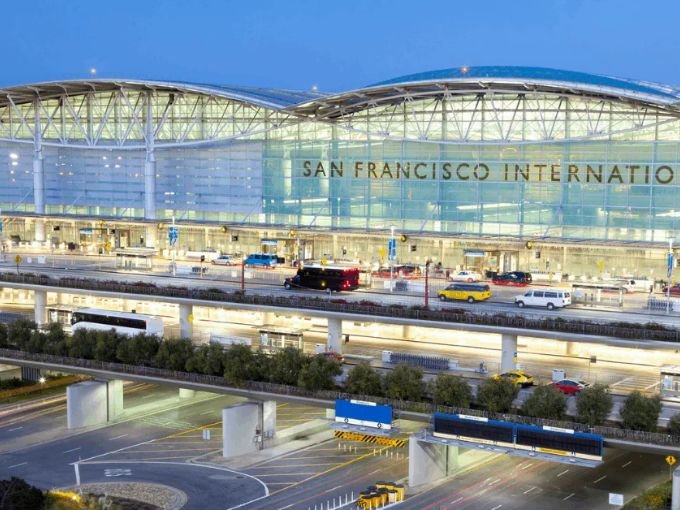
SWISS International Air Lines operates from the International Terminal at San Francisco International Airport (SFO). The airline is listed in the International Terminal G area, which serves several international carriers. Passengers travelling from San Francisco to Zurich should visit the International Terminal for check-in and departure procedures.
SFO has multiple passenger terminals, so knowing the correct location can save time and prevent confusion on travel day. SWISS passengers should also check their flight information for the latest check-in counter, security checkpoint, and boarding gate. This guide explains the terminal arrangements, arrivals, departures, and useful airport facilities for SWISS travelers at SFO.
SWISS Airlines Terminal Location and International Gate Area at SFO
The International Terminal is the main departure and arrival area for SWISS international services at San Francisco Airport. Its G-side gate area is used by SWISS and several other international airlines. The check-in desks are located in the International Terminal’s main hall on the Departures Level.
| Airport Information | Details |
|---|---|
| Airline | SWISS International Air Lines |
| Airport Name | San Francisco International Airport |
| Airport Code | SFO |
| Terminal | International Terminal |
| Common Gate Area | International Terminal G |
| Security Checkpoint | Checkpoint G |
| Departures at SFO | International Terminal |
| Arrivals at SFO | International Terminal |
| Main International Route | San Francisco to Zurich |
| Airport Location | San Francisco, California, USA |
| Official Airline Website | https://www.swiss.com/ |
Check-In, Baggage Drop, and SWISS Departures at SFO
Passengers flying with SWISS should go to the International Terminal’s Departures Level to locate the airline’s check-in desks. The airport information screens show the current counter assignments, which can change according to flight schedules and airport operations.
Travelers who have already checked in online should confirm whether they need to visit the counter for passport verification or checked baggage. After completing check-in and baggage drop, proceed through the appropriate security checkpoint and follow the signs toward the G gates.
A few practical steps can help make departure easier:
- Check your flight status before travelling to the airport.
- Confirm the SWISS check-in counter using the airport displays.
- Keep your passport and boarding pass ready.
- Review checked baggage and cabin baggage requirements.
- Allow enough time for international security screening.
- Check the boarding gate again before heading to the departure area.
Departures at SFO for SWISS generally use the International Terminal G area. The airline also identifies the G security checkpoint for eligible priority security access, but passengers should follow the checkpoint instructions shown for their flight.
SWISS International Arrivals at San Francisco Airport
Passengers arriving on SWISS international flights should follow the signs toward the International Terminal arrivals area. After leaving the aircraft, travelers entering the United States must complete the required immigration and customs procedures.
Once passport control is complete, passengers with checked luggage can proceed to baggage reclaim. The airport displays provide the carousel information for each arriving flight. After collecting baggage and clearing customs, travelers can continue to the public arrivals area for pickups or ground transportation.
| Arrival Stage | Passenger Guidance |
|---|---|
| Leaving the Aircraft | Follow signs for international arrivals |
| Immigration | Complete U.S. entry procedures |
| Baggage Reclaim | Check the screens for the assigned carousel |
| Customs | Follow the instructions for arriving passengers |
| Public Exit | Continue to the International Terminal arrivals area |
Arrivals at SFO are subject to U.S. entry requirements. Passengers connecting to another flight should allow sufficient time for immigration, baggage collection, customs, and any required baggage recheck or security screening.
Dining, Lounges, and Passenger Facilities Near Gate G
The International Terminal offers a variety of services for passengers waiting for international departures or arriving at San Francisco. Travelers using the G gate area can find dining, shopping, and other passenger facilities inside the terminal.
Useful facilities include:
- Restaurants, cafés, and quick-service food outlets
- Duty-free shops and retail stores
- ATMs and currency exchange services
- Passenger information desks
- Wi-Fi and charging facilities
- Restrooms and accessible passenger services
- Airline lounges for eligible travelers
- Airport transportation and terminal connections
SWISS First and Business Class passengers may also have access to priority security facilities where eligible. Lounge access depends on the ticket, frequent-flyer status, and applicable airline rules, so travelers should verify their eligibility before arriving.
Official SWISS and SFO Airport Travel Information
Passengers can use the following official websites to check flight schedules, baggage policies, airport maps, check-in details, and terminal updates.
| Travel Resource | Official Website |
|---|---|
| SWISS International Air Lines | https://www.swiss.com/ |
| San Francisco International Airport | https://www.flysfo.com/ |
A Few Final Tips for SWISS Passengers at San Francisco International Airport
SWISS Airlines passengers should use the International Terminal at SFO, with the G gate area serving the airline’s international operations. Check-in desks are located in the terminal’s main hall, while departures and arrivals are handled through the airport’s international facilities.
Before leaving for the airport, confirm your flight number, check-in counter, and latest gate assignment. If you are meeting an arriving passenger, monitor the live arrival information rather than relying only on the scheduled landing time. These precautions can make your journey through SFO more organized and convenient.