
What Terminal Is TAP Portugal at Barcelona Airport? (BCN)
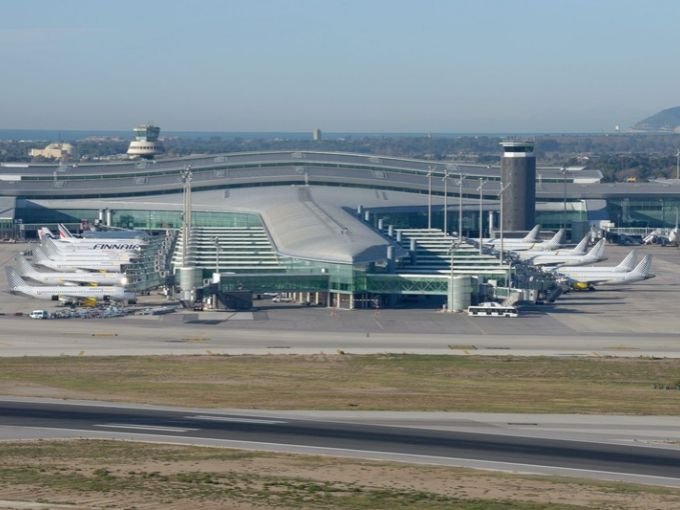
TAP Air Portugal passengers travelling through Barcelona-El Prat Airport should head to Terminal 1. The terminal serves the airline’s flights between Barcelona and Lisbon, as well as connections to other destinations. Whether you are preparing for a departure or arriving in Barcelona, knowing your terminal in advance can help you plan check-in, baggage collection, and onward transportation.
TAP Portugal Airlines Terminal and Airport Details
Barcelona-El Prat Airport has two main passenger terminals, Terminal 1 and Terminal 2. TAP Air Portugal operates from Terminal 1, where passengers can find check-in facilities and access their departure gates.
| Airport Information | Details |
|---|---|
| Airline | TAP Air Portugal |
| Airport Name | Barcelona-El Prat Airport |
| Airport Code | BCN |
| Main Terminal | Terminal 1 |
| Departures | Terminal 1 |
| Arrivals | Terminal 1 |
| Check-In Area | Terminal 1, Departures Level |
| Baggage Assistance | Contact the airline’s designated handler |
| Airport Location | Barcelona, Spain |
Check the airport information screens for your flight’s current counter and gate assignments.
TAP Portugal Airlines Departures: Check-In and Boarding Steps
Passengers departing with TAP Portugal should go to Terminal 1 and check the airport displays for their designated check-in counter. After completing check-in and dropping off checked baggage, follow the signs to security screening and your boarding gate.
| Departure Service | Information for Passengers |
|---|---|
| Check-In | Follow the counter information displayed at the airport |
| Online Check-In | Review available options through TAP Portugal |
| Baggage Drop-Off | Confirm the counter and baggage deadline |
| Security Screening | Keep your boarding pass and travel documents ready |
| Boarding Gate | Check the airport displays for the latest assignment |
| Before Departure | Review flight status and boarding time |
Arrive with sufficient time to complete check-in, baggage drop-off, and security procedures. Follow the instructions provided with your booking.
TAP Portugal Airlines Arrivals: Baggage Claim and Pick-Up
Passengers arriving with TAP Portugal should follow the signs to the arrivals area and baggage reclaim at Terminal 1. Check the airport displays for your assigned baggage carousel. If you are collecting a passenger, confirm the flight’s arrival status before travelling to the airport.
| Arrival Service | What to Expect |
|---|---|
| Arrival Terminal | Terminal 1 |
| Baggage Collection | Follow the screens to the assigned carousel |
| Lost Baggage | Contact the airline’s baggage service |
| Passenger Pick-Up | Arrange a meeting point near the arrivals area |
| Flight Delays | Check updated arrival information |
| Ground Transport | Follow signs for taxis, buses, and other transport |
Keep your baggage tag and travel documents available if you need to report missing or delayed luggage.
TAP Portugal Airlines Travel Advice for a Hassle-Free Journey
Preparing your documents and baggage before reaching the airport can make your journey easier. Review your booking and make sure your luggage meets the airline’s requirements.
| Travel Checklist | Recommended Action |
|---|---|
| Boarding Pass | Keep a digital or printed copy accessible |
| Passport or ID | Carry the documents required for your destination |
| Cabin Baggage | Check the allowance included in your fare |
| Checked Luggage | Confirm weight limits and drop-off deadlines |
| Flight Updates | Monitor notifications for changes |
| Special Assistance | Contact TAP Portugal in advance if required |
For international journeys, verify passport validity, visa requirements, and any transit rules that apply to your itinerary.
TAP Portugal Airlines Connections and Airport Transport
If Barcelona is part of a longer journey, confirm the terminal for every flight on your itinerary. TAP Portugal uses Terminal 1, but a connecting flight operated by another airline may have different arrangements. Allow enough time for transfers, security checks, and baggage collection when necessary.
| Passenger Need | Helpful Information |
|---|---|
| Terminal Directions | Follow airport signs to Terminal 1 |
| Connecting Flights | Verify the next flight’s terminal and operator |
| Baggage Transfers | Confirm whether your luggage is checked through |
| Public Transport | Follow signs for airport buses and other services |
| Taxi or Pick-Up | Use the designated airport areas |
| Flight Information | Check the latest airport updates |
If your flights are booked separately, review the connection requirements and allow additional time in case you need to collect and recheck your luggage.
Official TAP Portugal Airlines and Barcelona Airport Links
Use these official resources to check airline information, check-in arrangements, and airport updates.
| Resource | Official Website |
|---|---|
| TAP Air Portugal Website | https://www.flytap.com/ |
| TAP Air Portugal Check-In Guide | https://www.flytap.com/en-gb/check-in-information |
| Barcelona Airport Airline Directory | https://www.aena.es/en/josep-tarradellas-barcelona-el-prat/airlines-and-destinations/airlines.html |
| TAP Portugal at Barcelona Airport | https://www.aena.es/en/josep-tarradellas-barcelona-el-prat/aerolineas/tap-air-portugal.html |
| Barcelona Airport Information | https://www.aena.es/en/josep-tarradellas-barcelona-el-prat.html |
Make Your TAP Portugal Trip Through Barcelona Easier
Terminal 1 is the designated terminal for TAP Air Portugal at Barcelona-El Prat Airport. Before travelling, confirm your check-in counter, baggage arrangements, and departure gate. If you are arriving in Barcelona, review your flight status and baggage collection details before arranging transportation. These simple checks can help you navigate the airport more confidently.
Frequently Asked Questions
TAP Air Portugal uses Terminal 1 at Barcelona-El Prat Airport BCN.
Both arrivals and departures generally use Terminal 1. Check your flight details for the latest operational information.
Go to Terminal 1 and check the airport information screens for the current counter assignment and baggage drop-off instructions.